
The Information bar is in a special situation as it combines several functions in one element.
On the left hand side is the field for indicating Snap [S], Orthogonal modes [O] and Auto-connection [A].
The following icons show the
setting status of conductors, plc modules, connect and load and conductors.
Click in the icon will show you the setting parameters.
Next to it are displayed the mouse key functions when you are working within a function. Thus you can see at any time what function you are carrying out with the mouse keys. This also ensures that you know in advance what the next action should be.
Most of the space is taken up
with the field for text input. Whenever WSCAD
5 expects an input other than via a dialog box
(e.g. entering a function text) this field is activated and highlighted
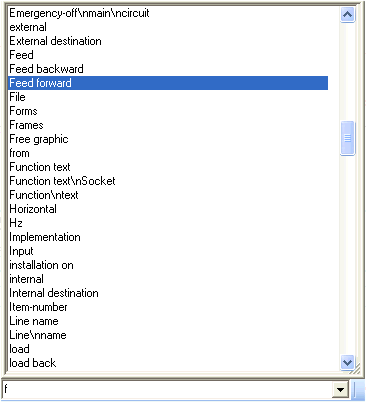
in colour. Simply click on the small button (‘ò’) to the right of the input field and you will be given a
list of the last 20 inputs. Additional when you're using the Foreign Languages Function
/ Quick Text
you will get the corresponding entries of the lexicon. This listing is
resizeable. You can then make your selection and transfer it using the
button next to it on the right (ü).
The next field shows the current drawing colour. There are 16 colours available in WSCAD and these colours can be defined as you wish. The field is opened with a single mouse click and you can then change the colour quickly and easily.
The procedure is equally simple for the Line type: simply click and you get a list of the existing line types. This field does have an additional function: click with the right mouse button and a menu for Line width will appear. As all the choices are displayed in the selected line or background colour, this eliminates the need for choosing by trial and error.
Hint
You can of course attach the information bar to the upper edge of the screen or show it in its own window. In order to make more space it can also be made invisible: when a text input is required it appears automatically and disappears again after the text has been entered.