Insert graphic
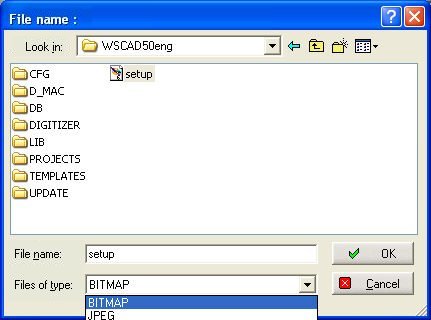
 With the menu command File / Import
/ Insert graphics, you can insert small graphics (max. 30 kB) in the
drawing. The colour resolution is essentially determined by the
size of the graphics file. The size (dimensions) must be set in a graphics
program. The Windows standard dialog will appear for opening the
file. Select the file and position it on the circuit diagram.
With the menu command File / Import
/ Insert graphics, you can insert small graphics (max. 30 kB) in the
drawing. The colour resolution is essentially determined by the
size of the graphics file. The size (dimensions) must be set in a graphics
program. The Windows standard dialog will appear for opening the
file. Select the file and position it on the circuit diagram.
Under WSCAD 5, the graphics
can be moved, copied and deleted but not edited.
When creating the graphics, bear in mind the output medium since a very
colourful bitmap can appear somewhat strange on a black and white printer.
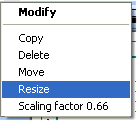
If you click on the Bitmap with the right mouse button,
then a context menu opens where you can choose one of the displayed functions
to change the Bitmap.
Caution
Not
all printers support the output functions for graphics. Pay
attention to the size of the graphics. Maximum:
30 kB (with an external graphics program, you can reduce the colour intensity
etc. and therefore the file size.)