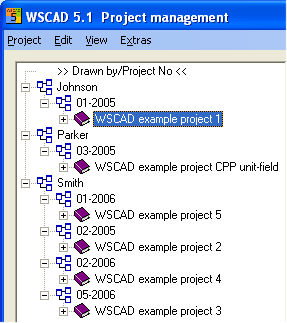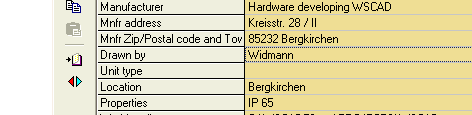
Sorting allows you to list projects in a specific way. You can sort either by project name (Standard) or by other project data. The project data are located in the Project manager on the right-hand side.
Example:
In the illustration below the 'Drawn by' field is highlighted.
For the purposes of selecting the project data it does not matter which project you are in at the moment.
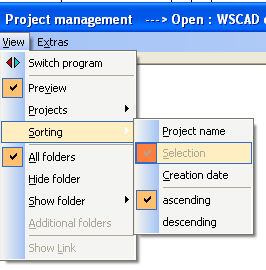
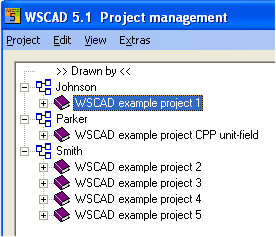
Highlight the field 'Drawn by' in the project data and select the menu item 'View – Sorting – Selection'. The project directory will then be sorted by 'Drawn by'. Similarly you can also determine whether alphabetical sorting is done ascending or descending. Now you can see that all the identified editors are given their own group containing their respective projects.
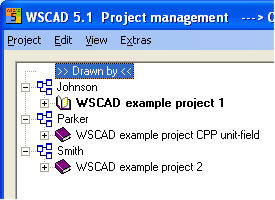
Further possible selections are sorting by (e.g.) >> Drawn by << or 'Project mode' (Standard or CPP).
Hint
If you choose to sort by 'Project name', the previous Selection is cancelled and the display reappears with project names listed alphabetically.
If neither 'ascending' nor 'descending' is selected, the display shows the projects in the order in which they were entered into the Project manager.
The option Selection 2 is creating a special view from your project view.
Here in this case the selection 1 is Drawn by . All project will be sorted to the belonging drawner.
Select now the field Project No. and start the menuitem View / Sorting / Selection 2
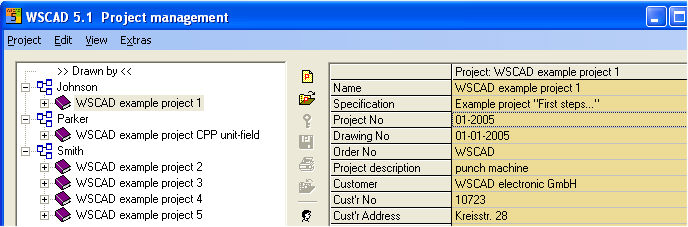
Now you see a second selection in the project tree.