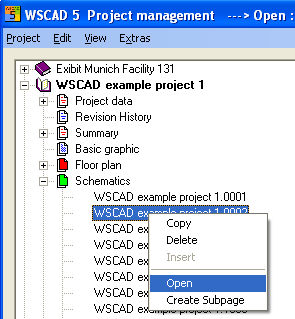
When you mark a diagram page, you will see the data for the diagram in the right hand window of the PM at the top and the relevant content in the Preview underneath. You can open the diagrams by double clicking on the filenames. The PM menu option Edit / Open leads to the same result.
The PM closes when the file opens. If no project is open, then the project which belongs to the diagram page opens after double clicking with the mouse.
Caution
If diagram pages are open which do not belong to the current project, then these will be opened as external files. In this case, any alterations are not monitored by the automatic functions.