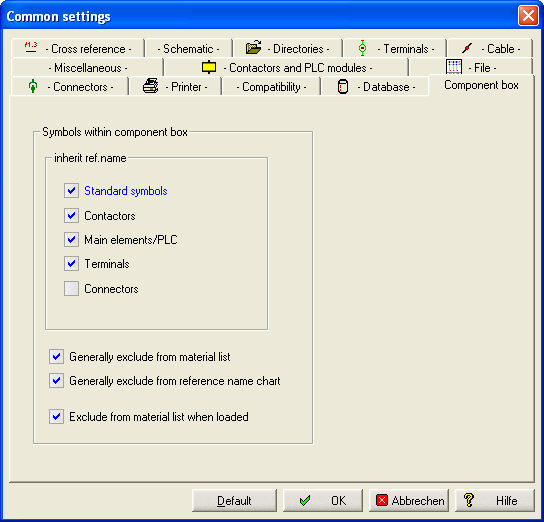
The component box has, due to its universal equipment, influence on almost all automatic functions.
Reference names
When you place, for example, a contactor in the component box, this contactor will be subject to contactor management. If you include a terminal, connector or socket in the form of a symbol, they will be visible in the terminal browser or the connector browser and connector management respectively and can thus be worked on. This also applies for PLC main elements.
In the Common settings, you can determine which symbol types shall "inherit" the reference name of the component box. Their respective reference name is then extended with the reference name of the component box.
Material list / Reference list
In the bottom part of the parameters you see the set up of the material lists. The option "Generally excluded from material list" and/or "Generally excluded from reference name chart" means a complete lock of all component boxes for the material list and the reference name chart inclusive symbols which are inside the box.
If this option is not selected you can set the Symbol type "Component box" for the Output Material list.
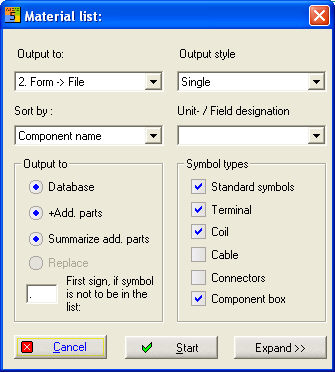
Because the component box can appear several times in one set of charts, the introduction of a master definition avoids the appearance of several identical references within the material list. If no master definition was carried out, only the element with the first coordinate is included in the material list. If for one reference the master definition was given several times, the symbol which is first recognized by this coordinate is used for the material list.
With the option "Exclude from the material list when loaded" in the Common settings you can assure that the symbols you put in an existing component box receive an individual lock to the Material list.