 The parameter dialog is started by calling the menu item or by clicking a symbol
with the right mouse button. A menu with the symbol parameters
is opened for the selected symbol where the values can be modified.
The parameter dialog is started by calling the menu item or by clicking a symbol
with the right mouse button. A menu with the symbol parameters
is opened for the selected symbol where the values can be modified.
The parameter dialog is started by calling the menu item or by clicking a symbol
with the right mouse button. A menu with the symbol parameters
is opened for the selected symbol where the values can be modified.
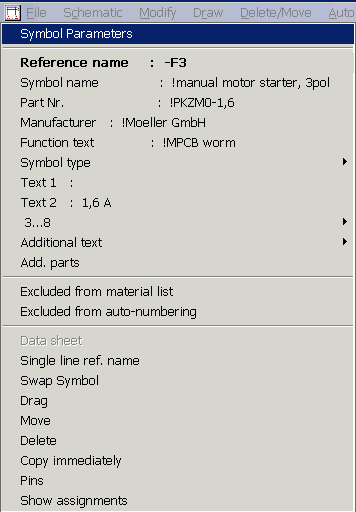
All texts belong to General text type with a specific (internal) coding. The modification possibilities are the same as for General text. The width of the window adapts dynamically to the length of the text. By clicking on the respective line, you can modify or enter new parameters in the input field:
Reference name
Symbol name
Part number: This serves as an index for access to the WSCAD database. When the line part number is selected in the professional version while data bank access is activated, the database selection opens again, as when loading the symbol, and the parts are displayed according to code letters and selection criteria. The symbol parameters symbol name, part number and additional texts are copied, and additional text 1 and 2 are not changed! When aborting or if there are no parts in the database which correspond to the code letter, the part number can be changed manually. In the compact version, it is possible to enter the part number through the input line.
Manufacturer: Applied in the compact version to link symbols with the manufacturer who generally supplies the part concerned.
Note
If a new contactor is selected for a coil and the contactor management is switched on, cradle, contact labelling and cross-reference text are corrected automatically (menu point Change / Contactor).
Function text. This can be copied via placeholder (see placeholder) to the terminal chart, cable chart / list and material list. When a contact is assigned, the function text of the coil is, if contactor management is switched on, also displayed in the assignment dialog for better orientation.
The symbol type can be changed.
Other parameters: 16 texts for additional information such as fuse rating, performance or other data. You can access these texts in the material list by using placeholders.
In the automatic contactor definition, text2 is used to determine electric power or current.
The data base for the the Additional parts.
The Option Excluded from material list activated by left click.
The Option excluded from auto-numbering activated by left click.
Note
You also have quick access to the symbol parameters via Modify/Object properties/Symbol.