 Via the
menu option Connection line or by selecting a connection line
with a click of the right mouse button, another menu appears with commands
which can be used to influence the course of the connection and
its line name later on.
Via the
menu option Connection line or by selecting a connection line
with a click of the right mouse button, another menu appears with commands
which can be used to influence the course of the connection and
its line name later on.
Via the
menu option Connection line or by selecting a connection line
with a click of the right mouse button, another menu appears with commands
which can be used to influence the course of the connection and
its line name later on.
In order to change line parameters later on, simply click on the connection concerned with the right mouse button. The associated context menu appears.
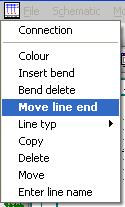
A bend is placed in a piece of straight line. First select the piece of line, then you can specify the point of the bend by positioning the mouse pointer accordingly. The connection line can be moved like an elastic band and re-positioned.

On a connection line, select the point of the bend that you want to remove. Remove the bend by pressing the left mouse button (or the <Return> key).
Select the start or end point of a connection line and re-position it. A connection node at the end of the line cannot be moved.
Setting for the current color of the connection line.
Setting for the line type.
Deletes or copies a connection.
Moves the current connection line.
The full dialog appears, enter the line name if this is not generally blocked. The appearance of the dialog is also determined by the on-line destination wiring parameters setting under Parameters / General / Compatibility. If this has been activated, then you can enter the line name in the dialog which then opens, otherwise the entry is made via the entry field of the Information bar. If you just want to move or rotate the line name, click on the line name directly with the right mouse button and the line name context menu will appear where you can select the desired action. When changing, the dialog then appears again, enter the line name if this is not generally blocked.