 The 'Reference
name' command is used to change the reference name of existing components
on a drawing. The 'Reference
name' command opens the 'Reference' menu, from which you can select the desired modification command.
The 'Reference
name' command is used to change the reference name of existing components
on a drawing. The 'Reference
name' command opens the 'Reference' menu, from which you can select the desired modification command.
The 'Reference
name' command is used to change the reference name of existing components
on a drawing. The 'Reference
name' command opens the 'Reference' menu, from which you can select the desired modification command.
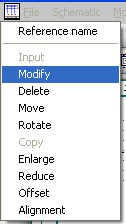
Here you can change, delete or move the name; rotate it 90°; enlarge or reduce its size; or offset it from the cursor position. After selecting the desired modification command, from the 'Reference' menu, identify the specific component you wish to modify, using the left mouse button (or <Enter> key). If you are modifying the name, the existing name appears in the prompt field, at the bottom of the screen, ready for modification. After making the required changes, accept them with the left mouse button (or <Enter> key) and then position the text as required.
Hint
The existing name appears in the prompt field
The Move, Rotate, Enlarge and Reduce commands also prompts you to position the text. Remember that if you wish the name to be invisible in the drawing, place a '!' in front of it. The name remains visible until it has been positioned.
Hint
If you change the reference name of a coil and the contactor manager is on, the reference names of all contacts and the comb will be changed automatically. In this case it is not possible to do it by modifying the Symbol parameters!
Any character combination is possible for a component reference name, e.g. '-3K', 'AB.1/z', 'K2'.
Hint
Please remember that Auto-numbering will change or extend the names.