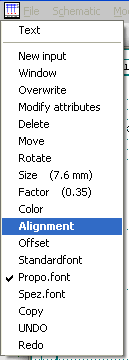
The text alignment can be specified for any text, whether it is General text, Free text or symbol parameters.
For example, click on a General text with the right mouse button and select the Alignment command in the following object menu.
The following dialog appears in which you can specify the text alignment.
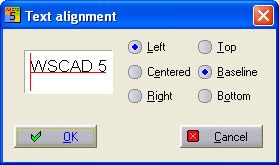
You can see how it will look in principle in the small preview window.
Hint
In regard to older files (up to V4.1), when changing into the new file format, the reference names are also provided with a text alignment automatically (normally right-justified, since the reference is left of the symbol). Thus, a re-calculation of the position is omitted with the automatic numbering.
Important
When creating your own symbols, you must make certain that the text alignment of the reference name is set correctly e.g. Text alignment right, if the reference name has been positioned left of the symbol.