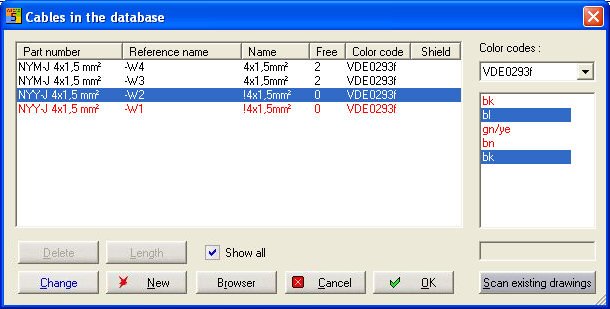
You can change the wire colour within the Cable manager dialog or directly within the schematics. Open the Cable manager dialog via the menu command 'Automatic funct. – Cable manager'. Select the cable you want to modify. Select the colour you want the change. Press and hold the <Ctrl>-key and select the new colour. Click on the 'Change' button.
You can change one or several wire colours. Then click on the OK button to close the Cable manager dialog.
alternative way
In the schematics right click the wire you want to change. You'll get an information dialog denoting which component is selected. If the conductor is listed confirm with YES. Select the command 'Change colour/wire' in the Symbol parameters menu. You get a dialog which lists the available colours of the assigned colour code, similar to the Cable manager dialog. The currently selected wire is marked with a '<-':
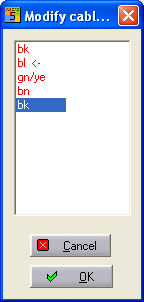
Select another colour and then click on the OK button, the new colour will be copied to the element in the schematics.
Hint
If you select a used colour as the new colour, the two colours will be exchanged