 This function
automatically generates line names (wire numbers) in different styles
for all the lines (i.e. connection lines with the same potential), which:
This function
automatically generates line names (wire numbers) in different styles
for all the lines (i.e. connection lines with the same potential), which:
This function
automatically generates line names (wire numbers) in different styles
for all the lines (i.e. connection lines with the same potential), which:
don't have an open line end
do not already have a line name
With the menu command Automatic funct. – Auto. Line names - Create you get the following dialog to determine how the line names are to be created:
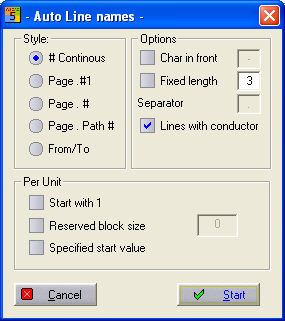
The five main methods are:
|
Main Method |
Example |
|
# continuos |
1,2,3,..... |
|
Page . #1 |
1.1, 1.2, .....2.1, 2.2,..... |
|
Page .# |
1.1,..1.2,.....2.3, 2,4,...... |
|
Source/Target |
-Q6:1,-Q6:3,... |
|
Page . Path # |
1.3, 1.3A, 1.4, 1.5, |
If you select Source/Target the complete reference name with pin number will be the new line name.
Settings:
It is also possible to specify a hyphen or other symbol as a preceding character.
With the option 'Fixed Length' you can set a constant length for the names, e.g. 0001,0002 etc. …
The option Lines with Conductor indicates whether line names should also be generated for the connections where there is already a component of the type 'Cable Conductor'.
The options of the group ‘Per Unit’ only work under the setting ‘# Continuous’
Start at 1 means that for every new unit designation the names start at number 1 (units are for example part projects with extended reference names such as: =Unit1, =Unit 2, etc.)
Reserved block size means that you can choose a range to suit the job. When you enter e.g. 200 and in the first unit 153 lines are numbered, the second unit numbering will begin at 200. If 203 lines are numbered then the next series will start at 400.
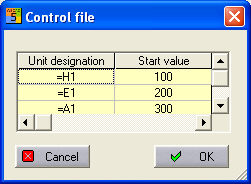
Specified start value opens up a dialog which can store
permanent values for the various unit.
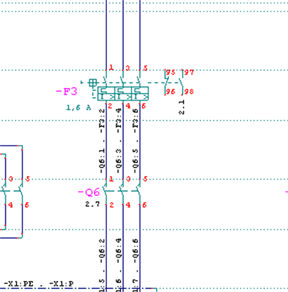
The generated line names conform automatically to the current drawing functionality and path settings
The currently used drawing functionality and path settings determines the position of the line name. With horizontal functionality selected (USA) the line name is positioned in the middle of a horizontal line, with vertical functionality selected (Germany) it is positioned in the middle of a vertical line. Similarly this determines whether the horizontal (Germany) or the vertical (USA) path settings are used for the line names.
Warning
Manually marked line names can no longer be deleted automatically!