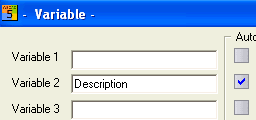
When updating page numbers, page quantity, date and time, only the characters up to the first number are transferred unchanged; the current number is then appended. All other variables are generated completely from new. Select the variables to be updated with the options in the ‘Automatic’ group.
You can transfer the date of the current page onto all the other pages.
When updating the date, you can choose via a dialog whether to transfer the current value across to all the pages (meaning that every page will then have the same date), or to retain the date of the last drawing modification. (Note! A drawing will have been modified even after you have drawn only one line and deleted it again!).
‘Variables 0 to 9’ will be distributed to the whole drawing set as they were originally entered. Position, size, direction and value of the variables in the currently displayed drawing will be transferred to the whole drawing set if the switch ‘Position and size remain unchanged’ is off; if it is on, only the value will be updated.
TIP
Before a variable can be automatically handled, it must first be entered and placed by hand, otherwise the Automatic command will not be able to find it.
TIP
The variables ‘Date’ and ‘Time’ are automatically updated when a modified drawing is saved, if this is allowed in the Configuration.