Drawing sheet Variables
 This command transfers
general functional information such as page descriptions into a project
summary. You can enter and automatically manage 10 general variables (0 … 9) as well as variables for ‘Page number’, ‘Page
quantity’, ‘Date’, ‘Time’ (year
2000 compliant), ‘File
name long’, ‘File name short’, ‘Next page’, and ‘Previous
page’. They can then
be distributed throughout the whole drawing set. In the case of
the variable ‘File
name long’, the full name,
consisting of drive directories and file name is copied across.
In the case of ‘File name short’, only
the file name itself is copied.
This command transfers
general functional information such as page descriptions into a project
summary. You can enter and automatically manage 10 general variables (0 … 9) as well as variables for ‘Page number’, ‘Page
quantity’, ‘Date’, ‘Time’ (year
2000 compliant), ‘File
name long’, ‘File name short’, ‘Next page’, and ‘Previous
page’. They can then
be distributed throughout the whole drawing set. In the case of
the variable ‘File
name long’, the full name,
consisting of drive directories and file name is copied across.
In the case of ‘File name short’, only
the file name itself is copied.
The numerals in the file name extension gives the page
number; the page quantity is the file name extension of the final page
The text is always displayed on a single
line and the length is limited to 48 characters
The variables ‘File name
short/long’ and ‘Variables
0 to 9’ are distributed to all the pages when
the Automatic function is activated, whereas the other variables such
as the Page numbers are set on-line.
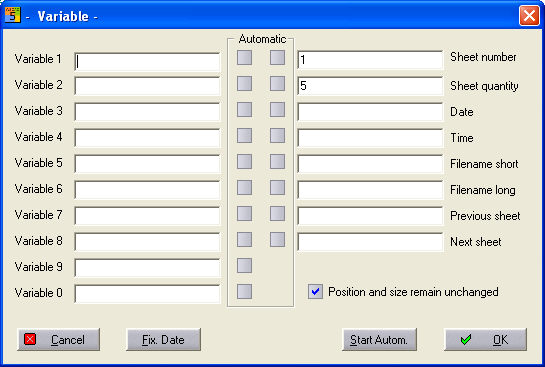
When this command is activated, the following
dialog appears, containing all the variables of the active drawing window.
Thus you can see at a glance all the variables for this page.