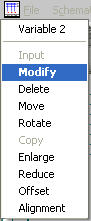
Select the field of the relevant variable and insert the desired text. You can of course edit several variables before sending the information to the circuit diagram with the OK button. If you modify an existing variable, only the new value will be entered: all the other settings such as the position remain unchanged. After entering a new variable you will see the following menu:
In the above example, Variable 2 was entered. You can now set the position (‘Move’) or, for example, alter the size. After you have positioned the variable correctly with ‘Move’, you can quit out of the menu with ESC or the right mouse button. If you have entered several new variables, this process must be repeated for each variable.
Remember
You only need to enter variables onto one page of your drawing set; the distribution and updating for the complete set, is then done with the 'Automatic' command.