 Here, there
is no need to enter a name. All the symbols
from the symbol
type, Terminal, (i.e. whatever the reference name) are edited. Then
you have to select the output device.
Here, there
is no need to enter a name. All the symbols
from the symbol
type, Terminal, (i.e. whatever the reference name) are edited. Then
you have to select the output device.
Here, there
is no need to enter a name. All the symbols
from the symbol
type, Terminal, (i.e. whatever the reference name) are edited. Then
you have to select the output device.
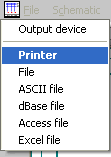
On file you must decide the filename for the new terminal diagram.
First, decide on the first filename of the first new terminal diagram.
Then select the appropriate form in a dialog. This form is filled with the information from the circuit diagram and printed out or displayed on the screen.
With the vast majority of forms, a separate new terminal diagram is generated for each terminal strip. However, there is also the option of outputting all terminal strips directly one after the other by using the wildcard kbezM.