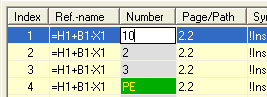
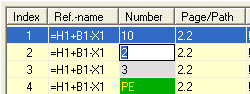
The individual terminal strips can be numbered manually. You can also renumber all terminal strips. Specify the desired terminal number in the Number field for the first terminal connection by marking the Terminal connection field in the Number column and entering the start value there. The value is saved by pressing Return and the next field in the Number column then becomes active. With this, it is also possible to number the terminals manually. If this is not what you want, cancel with <Esc>.
Select the other terminal connections. You can select the terminal connections by clicking with the left mouse button (for selecting a single terminal connection), holding down the <Ctrl> key + left mouse button (for selecting several terminal connections), holding down the <Shift> key + left mouse button (for selecting a range) or by clicking on the column header to mark all the terminal connections and the type of numbering has to be determined:
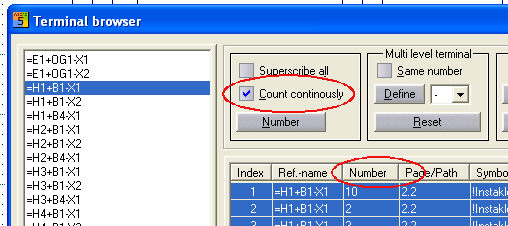
Continuous also includes terminals such as N and PE internally in the count and increases the next terminal number by these terminals which have been included in the count. However, N and PE are not overwritten.
Overwrite all overwrites all existing texts in the Number field section (including N and PE).
By pressing the Number button, the marked terminals are counted up from this start number.
E.g. Index 1 is changed to 10 by using the Continuous option
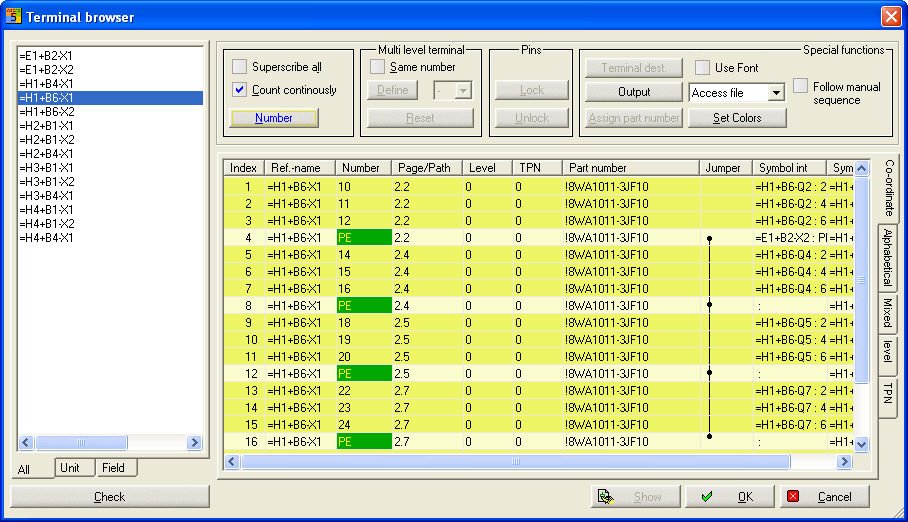
Result: Terminals which have been changed are marked darker yellow in the individual list and the terminal strip which has been changed is marked red in the tree on the left.
Confirm with OK and the terminal numbers in the terminal diagram are now changed.

The Overwrite all option also replaces terminal numbers such as N and PE terminal numbers with continuous numbers. Caution: no way back.