 The command in the main
menu Automatic / Content specification / Consisting of variables
from all diagram pages prepares the content specification in the conventional
style by using the variables.
The command in the main
menu Automatic / Content specification / Consisting of variables
from all diagram pages prepares the content specification in the conventional
style by using the variables.
The command in the main
menu Automatic / Content specification / Consisting of variables
from all diagram pages prepares the content specification in the conventional
style by using the variables.
The Overall evaluation of the new Project Manager can be converted to the previous mode by means of the option Content specification consisting of variables from all diagram pages. You set up a list (overview) which contains certain information (variables) from each page of the circuit diagram. Use, for example, the variable 6 to briefly name the function of each circuit diagram page. Enter the function text on each page via the Variable command. In this example, the variable (6) must be the same on each page but the position and size of the text can be selected according to your requirements.
In the next dialog, you can either work with a graphics form (Professional Version only) or specify which variable should be used for the content specification.
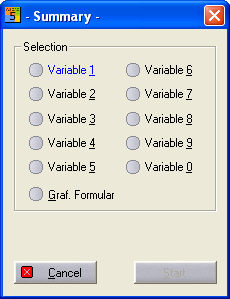
When you select the option Activate graph. form, you do not need to select any of the variables offered. Rather, the output takes place in a graphics form. Consequently, the wildcards in the form concerned determine the information of the content specification. The content specification in a form can be in several columns (up to 4). The columns can be assigned page numbers (always the three-place name extension) as well as the variables 0 to 9 beforehand as variable wildcards (# as the first character).
Important
The graphics form must use old wildcards. The new forms of WSCAD Version 5 have no such wildcards. The multi-column output can also be controlled via the configuration so that approximately the same number of lines is output in each column.
Tip
It is essential that you avoid using Automatic to edit a variable which you are using for the content specification. Otherwise the text of the variables on all the pages will be overwritten by the text of the variables of the drawing which is loaded. This process cannot be reversed with UNDO.