 The Parameter dialog is started
after invoking the menu option or clicking on a symbol with
the right mouse button. A menu is opened with the symbol parameters
for the selected symbol – the values can be changed.
The Parameter dialog is started
after invoking the menu option or clicking on a symbol with
the right mouse button. A menu is opened with the symbol parameters
for the selected symbol – the values can be changed.
The Parameter dialog is started
after invoking the menu option or clicking on a symbol with
the right mouse button. A menu is opened with the symbol parameters
for the selected symbol – the values can be changed.
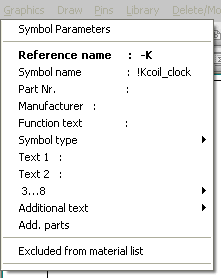
All texts are of the General text type with an (internal) separate identification. The changes which can be made correspond to those of General text. The width of the window adjusts itself dynamically to the length of the text. Parameters can be re-entered or changed in the entry field by clicking on the relevant line.
Reference name
The reference name is used as the basis of the resource identification (e.g. R for a resistor, F for a fuse or K for a contactor). The reference name also has a significant influence on the access to the database in the Professional version. The reference name can be placed anywhere or rotated but, with automatic numbering, it is extended in accordance with the type of numbering selected. The reference name can be made invisible by using the prefix !. The user must set the text orientation of the reference name.
A symbol can also be created without a reference name but will then not be available for the connection generator etc. The reference name comes under the Symbol parameters and can also be changed in the drawing manually via Symbol parameters.
Note
When using System and Location identification in the Profession Version, the reference name is extended internally with the System and Location identification.
Symbol name
Here, enter the name of the symbol by which it is to be found in the library. The name can be placed anywhere, rotated, enlarged or reduced in size. The symbol name comes under the symbol parameters and as such can also be changed at any time later on. The symbol name is also transferred to the Material list but the original name (in the library) is overwritten with corresponding text from the database in the Professional version when the database is accessed. The symbol name is normally not visible on the circuit diagram. This is achieved by prefixing it with an ‘!’ when the symbol is created.
By entering a certain lock character in the symbol name, you can prevent the symbol from being transferred to the Material list. The character (usually a full stop .) can be specified in the configuration and must be placed at the beginning of the symbol name, behind the leading !. This lock character takes on the function of a lock for the material list.
Note
Many symbols in the libraries supplied by us have general names such as !SSwitch1pol.. Give these symbols the names which are appropriate for your application (special Compact version) and in regard to the conversion file for the Material list.
Make sure that the name does not contain spaces, otherwise these will lead to problems when using the name for the conversion file.
Item number
The Item number is used as an index for access to the WSCAD database. If the line Item number is selected while the database access is activated in the Professional version, the database selection appears again as it does when loading the symbol and the components are displayed in accordance with the identification letters and selection criteria. The symbol parameters Symbol name, Item number and Additional text 2-16 are transferred and the Additional text1 is not changed. If aborted or if no components are in the database according to the identification letters, the Item number can be changed manually.
Manufacturer
Manufacturer is mainly used in the Compact version to allocate the symbols to the manufacturer who is mainly used for this element from the beginning.
Note
With a coil and with the Contactor Manager switched on, if a new contactor is selected, the comb, contact inscription and reference text are automatically corrected (menu option Change / Contactor).
Function text
The function text can be transferred to the terminal diagram, cable diagram/list and material list by means of wildcards (see Wildcards). When assigning a contact, with the Contactor Manager switched on, the function text for the coil is displayed in the assignment dialog at the same time for better orientation.
Symbol type
The Symbol type can be changed.
Additional texts
16 texts for additional information such as fuse rating, power or other information. These texts can be accessed in the material list by means of wildcards. Text2 is used for specifying the automatic contactor for the power or current specification.
Note
Quick access is also provided to the symbol parameters via the object properties.