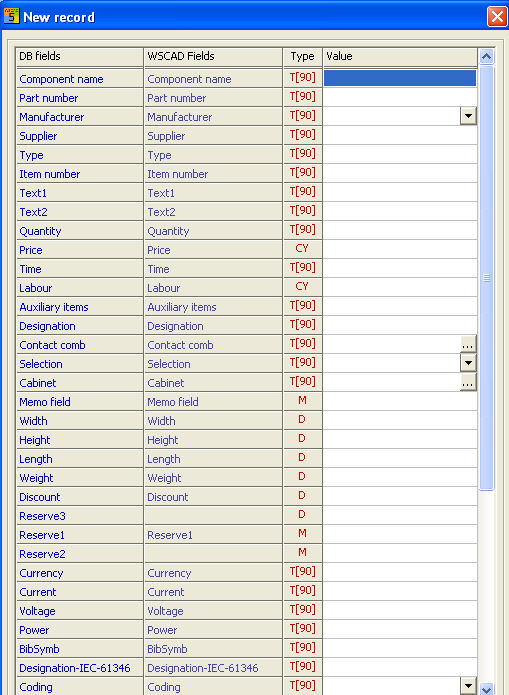
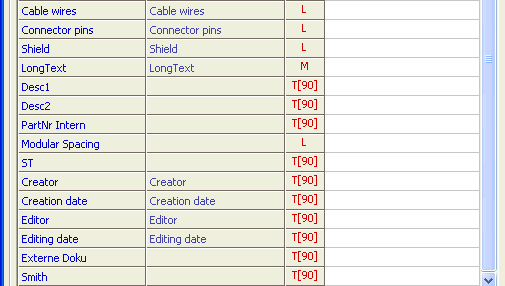
New record fields under parts manager submenu Modify/New record:
|
DB Fields |
Meaning |
|
Component Name |
Name of component. |
|
Part Number |
The part number is copied to the symbol parameters when a symbol is loaded. This is the most important database field! There must not be identical part numbers in the entire database; this is checked when new data is entered. The number can be different to the part designation of the manufacturer. |
|
Manufacturer |
Name of the manufacturer. |
|
Supplier |
Supplier. |
|
Type |
Any type indication, e.g. part numbers of the manufacturer, as long as they are not yet used in the parts field. |
|
Item number |
Additional piece number, e.g. manufacturer specific designation. |
|
Text1 |
General text. |
|
Text2 |
General text is copied to the symbol parameters when a symbol is loaded. This text should be used for indication of technical data such as electric power or current. |
|
Quantity |
Number of elements per symbol (for main part, always set 1). The value indicated here, multiplied with the number of symbols per set of drawings, gives the total number. |
|
Price |
Price of the component, two digits behind the decimal point. Attention: this is a currency field. |
|
Time |
Time needed (whole number, unit interpreted by the user) |
|
Labour |
Additional costs (e.g. for installation), two digits behind the decimal point. Attention: this is a currency field |
|
Auxiliary items |
An ! indicates that additional elements are existent. In the memo field you can see the belonging part numbers. The pieces are defined in a so-called combi-element. The interlinked list is further supported for reasons of compatibility, but should no longer be used. |
|
Designation |
Designation (Reference) of DIN40719. |
|
Contact Comb |
Symbol name of the corresponding contact comb of the contactor or relay. If you select the button [...], a window with the names of all the combs in the comb library opens. By clicking on a name, the field is automatically assigned and the code field extended. |
|
Selection |
This field is used to restrict database selection during the loading of a symbol. |
|
Cabinet |
The text entered here can be copied to the material list via the placeholders ssb and ssm. The name must correspond to the symbol names in the structure libraries (e.g. CONSTR_EXAMPLE) |
|
Designation |
Code letter (Reference name) of a piece of equipment, e.g. F for a fuse. When a symbol is loaded, only those elements are displayed, the code letter of which corresponds to the reference name of the symbol. This code is very important for contactor management. |
|
Memo Field |
The memo field represents the list of the parts that belong to a combined element. Here you enter the quantity and the part numbers of the individual elements, always separated by at least one (empty) space. Make sure that the part numbers exist in the database. |
|
With |
Specification of the symbol width in mm |
|
Height |
Specification of the symbol height in mm |
|
Length |
Specification of the symbol length in mm |
|
Weight |
Specification of the symbol weight |
|
Discount |
Discount |
|
Reserve3 |
Reserve |
|
Reserve1 |
Reserve |
|
Reserve2 |
Reserve |
|
Currency |
National currency (€) |
|
Current |
Electric current value (A) |
|
Voltage |
Voltage value (V) |
|
Power |
Power value (kW) |
|
BibSymb |
Name and Place of the Symbol |
|
Designation IEC61346 |
Code letters according to new DIN. |
|
Coding |
Color code or number code for connectors or cables. |
|
Cable wires |
Number of conductors in a cable |
|
Connector pins |
Number of connector pins |
|
Shield |
Cable has shield (1) or not (0) |
|
Long text |
Describing text |
|
Desc1 |
Describing text |
|
Desc2 |
Describing text |
|
PartNr Intern |
Part number for internal use |
|
Modular Spacing |
Standard is 0. |
|
ST |
|
|
Creator |
Name of author |
|
Creation date |
Date of creation |
|
Editor |
Name of editor (update) |
|
Editing date |
Date of editing (update) |
|
Externe Doku |
Here the file name and the storage location of the extended documentation file are displayed. |
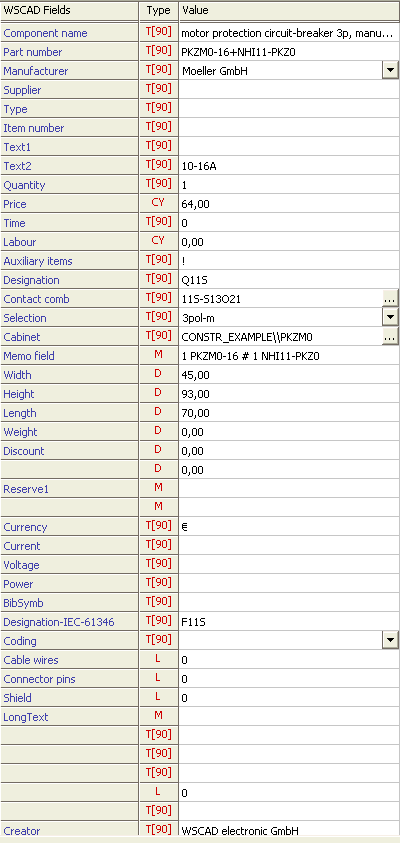
Example of a component: