 In addition to the label sizes, you
can control which labels are created.
In addition to the label sizes, you
can control which labels are created.
In addition to the label sizes, you
can control which labels are created.
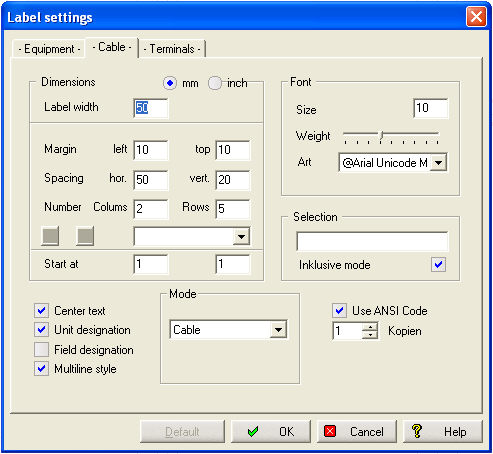
The text can be positioned left aligned or centered. You can determine if Unit, and/or field designation should also be processed. If so, you can output the text in Multiline style, e.g. different lines will be created for Unit designation, field designation and reference name. The required line distance is calculated from the font size used.
Hint
For left aligned text there is a margin of 5% of the label width.
WSCAD 5 offers 4 different types of cable labels:
|
Cables |
Cable name only |
|
Cable - Dest. |
Cable name + Reference name of destination (typically an external component) |
|
Cable - Source |
Cable name + Reference name of source (typically a terminal) |
|
Source - Cable - Dest. |
Reference name of source + Cable name + Reference name of destination |
Tip
Even when you select 'Multiline style' and the Unit or field designation is included, the Unit/Field information is not printed on a separate line.
If you want to specify further restriction criteria you can do it with the 'Selection' field. All the entered specifications refer to a reference name, depending on the type of cable label you have selected:
|
Cable label type |
Reference name |
|
Cable |
Cable |
|
Cable - Dest. |
Destination |
|
Cable - Source |
Source |
|
Source - Cable - Dest. |
Destination |
By use of the wildcards '?', '*' and '#' you can create the appropriate specification. Multiple specifications must be separated with a ';'. If the toggle 'Inclusive mode' is selected, only those components are processed which match the selection.
Copies
Here you can determine a label print out 1..9. (For Equipment and Cable labels).