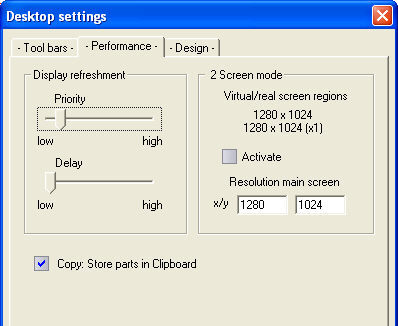
Under Microsoft Windows, the processing time for many different tasks is largely shared (Multitasking or Multithreading). Numerous processes are already running in the background (e.g. updating of function bars) without the user himself initiating the process. Within WSCAD 5, this effect can be used for displaying the working interfaces and the relationship between these and the drawing processes.
However, it is important to make sure that the settings are not too high otherwise some of the states which are displayed will not change quickly enough and will cause confusion instead. If in doubt, a comparison can be made between the current setting and “the setting against the left stop”.
Drawing priority
The relationship between the general display and the drawing processes is designated a drawing priority. At high priority, the process of refreshment of general displays during the drawing or functions such as moving or dragging is rarely invoked and the drawing processes are therefore accelerated.
Display delay
The display delay is defined as the time which elapses before the general displays on the working interface are refreshed. This includes, for example, the presentation of alternating types of function bar display or alternating types of button display. If the time is increased, more of the computer processing time is available for the drawing processes.
Note
WSCAD has no influence on the processing time demanded by other applications. If there is a time deficit, the best solution is to shut down as many other programs running at the time as possible. Note that this is often not synonymous with the iconisation.
Copying to clipboard
This option must be set in order to copy selected components or objects to the clipboard using the <Ctrl>+C key command and then pasting them to other Windows applications.