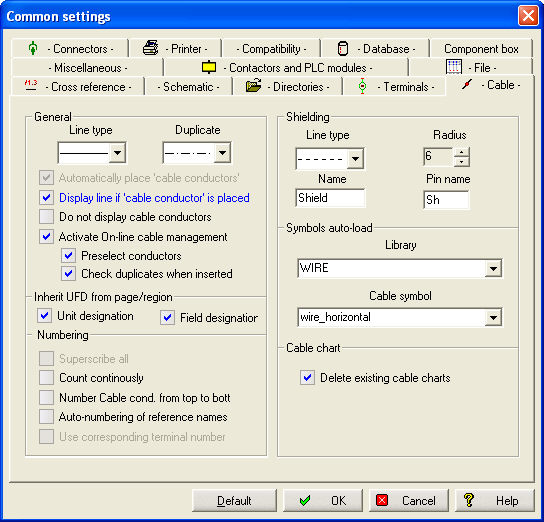
With the options of this tab, you can predefine cable settings. Most settings have no significance for the basic version and are therefore inactive. This is also where the basic settings for cable shield definition are located.
General
Line type duplicate
You can determine with which line type the cable line or its duplicate are to be represented. Modifications at this point result only in a modified representation of newly drawn cables.
Automatically place 'cable conducters'
When drawing a cable line, WSCAD 5 can automatically set symbols of the type cable conductor on the crossing points with the connection lines. The entered cable designations and cable types are then transformed into reference names or symbol names.
Display line if 'cable conductor' is placed
When cable conductors are set automatically, these symbols indicate the cable, and the element cable line is unnecessary. However, if you want to see a cable line in the circuit chart, you can determine with this option that a cable line (free diagram) with a color setting for cables shall be inserted. This cable line only has optical significance and will be hidden (see next option).
Do not display cable conductors
With this option, you can stop the representation of the cable line on the screen and on the printout.
Activate On-line cable management
Here you switch cable management on or off, which records in the background when new cable are installed or existing cables are modified.
Predefine conductors
If you select a cable from parts management, the color code that applies there will then be used in order to predefine the cores in cable management.
Check duplicates when inserted
The duplicate function checks the selected line names for their functionality.
Inherit UFD from page/region
With this option, you determine if the unit and field designation are to be copied to the cable chart, the cable list and the material list or not.
Superscribe all
When this option is activated, all symbols of the type cable core are numbered. Otherwise, only those cable conductors are changed which begin with a digit. This function is active only when cable management is switched off!
Count continously
When this option is activated, those cable conductors which already have a number (important: the first sign must not be a digit) are included in the numbering. This function is active only when cable management is switched off!
Number Cable cont. from top to bottom
As with terminals, numbering can be done from top to bottom or from left to right. Remember that for a diagonal line from top right to left bottom, this option must be activated if the left core is supposed to begin with 1.
Auto-numbering of reference names
The reference names of the cables are normally given manually. With this option, the reference names of the cables are included in automatic numbering after a previous query.
Use corresponding terminal number
This option makes it possible to copy the number of the connected terminal as a core number. For a cable between two terminals (or two standard symbols), the number from the internal side is copied.
Shielding
Under line type, you define the represented line of the drawn shield.
Radius determines the representation of the shield ends in the drawings.
Designation, here shield, is transferred to the function text of the shield symbol.
Connection Sh is the pin name of the shield connection.
Symbols auto load
Library: Here you determine the library that is to be used.
Cable symbol: Here the symbol from the library under Library is applied. The symbol must be of the symbol type cable wire !