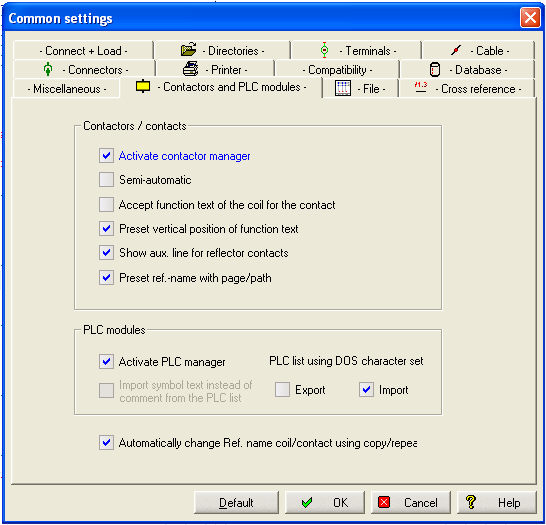
Within this group are all the settings for contactor and PLC processing. If you are working with a Basic module most of the settings are disabled (greyed).
Activate contactor manager
The automatic 'Contactor Manager' can be switched on. (Contactor Manager is only available in the Professional module).
If it is switched off, and contacts or coils are added or deleted, the contactor project file will cease to reflect these changes, and has to be generated anew.
Semi-automatic
If this option is activated you will be able to use the conductor browser this also prevents an automatic database call up during placing conductors.
Accept function text of the coil for the contact
If this option is selected, when a contact is placed and associated to an existing coil whose function text has already been entered, the function text of the coil will automatically appear ready for the text to be placed.
Preset vertical position of function text
If you enter 'Function text' when placing a coil, this text can automatically be displayed for each associated contact. The position of the text is pre-defined. If contacts are placed vertically (typically European style), the 'y' position is set by the location of the contact and the 'x' position is taken from the contact itself. If contacts are placed horizontally (typically North American style) the 'x' 'y' positions are reversed (Professional module only).
Show auxiliary line for reflector contacts
Activating this option will display an aux. line at same level as that defined for the location of the reflector contact in configuration. This line acts as a guide only and is not printed or plotted.
Preset ref. name with page/path
If you using this option, the ref. names of coils and contacts are preset with actual values of the sheet.
TIP
If 'Repeat' and 'Copy (immediately)' are used, no assignment will be detected, because single elements are copied.
Activate PLC manager
The automatic PLC-manager can be switched on. (PLC-manager is only available in the Professional module). If it is switched off, the PLC project file and PLC modules are added or deleted, the PLC project file will cease to reflect these changes, and has to be generated anew.
Import symbol text instead of comment from the PLC list
This setting determines if the symbol or comment is used when importing a PLC list, or creating a PLC list with WSCAD for Windows. The system is able automatically to read and assign Comment and Symbol Text from a S5 formatted list (only Professional module).
Note
This setting only takes effect if you are working without the PLC manager. The components for the PLC manager have text allocators for symbol and comment!
Export using DOS character set
This allows exporting a PLC list in a text file with DOS code.
Import using DOS character set
This allows importing a PLC list in a WSCAD project.