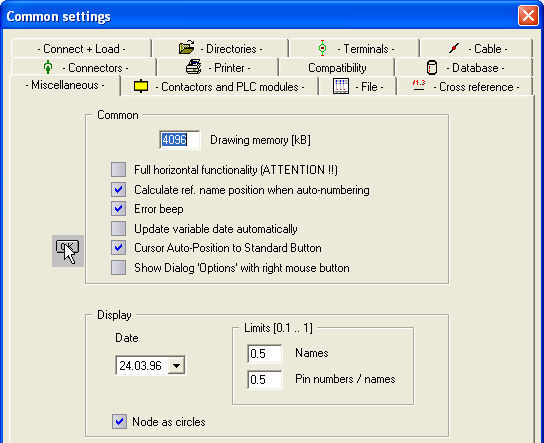
This group contains options, which do not fall clearly into any other category.
Drawing memory
This amount of drawing memory is allocated for every drawing window you create. The value is not as important for the actual drawing size (a typical drawing needs about 10-20kB), as it is for the speed of the automatic functions (Good value 4096kB).
Note
This settings also determines the maximum size of a symbol library!
Full horizontal functionality
For European drawings, the layout is typically in a vertical orientation and hence this option is NOT set as a default. In North America, the layout of schematics is typically in a horizontal orientation and hence the horizontal mode is required.
This option affects many functions:
The automatic connection feature when inserting a symbol
The automatic break in connection lines when inserting a symbol
The identification of terminals/cable conductors belonging together. For these components, the reference name can be taken from another component of the same type.
Automatic positioning of the contact combs
Display of the auxiliary line for the reflector contacts
Creating of reflector contacts
Creating and positioning of line related cross-reference texts.
Simple sorting algorithm
Typically, this option is not set; which means that the letters are outputted in sequence relative to the numbers. When the option is set, the numbers are outputted in sequence relative to the letters.
Example: For numbers in a terminal chart
NOT SET: 1A, 2A, 3A, 1B, 2B, 3B, 1C, 2C, and 3C...
SET: 1A, 1B, 1C, 2A, 2B, 2C, 3A, 3B, 3C,.....
This is also important for the sequence in which the contactors and contacts are displayed in the dialogs of the 'Contactor Manager'.
Calculate ref. name position when auto-numbering
With components that are placed in a vertical orientation (typically European), the reference name is located on the left side of the component. If the reference name has been moved, during automatic numbering, the reference name will be re-positioned to the existing location. To prevent this from happening this option should be deselected.
Error beep
Deselecting this option disables the warning beep when an error occurs. The error message is still displayed at the bottom of the screen.
Update variable date automatically
Select this option if you want the 'date' variable to be automatically updated each time a drawing is opened and modified.
Cursor Auto-Position to Standard Button
The cursor jumps always to the default button on each call up dialog.
ACCESS 2000 compatibility
If you select this option, all internal databases external Access lists (like Material list) will be saved in the new format except the large Access-database (wscad42.mdb) that includes all parts.
The Access-database must be converted with the program ACCESS 2000. Be carefully with this option cause ACCESS 2000 format is not readable in ACCESS97.
Display
Within this group, you can set the style of date presentation and the printout of nodes. The limits on the display of names and pin numbers/names affect what happens when you zoom. Depending upon the resolution and screen size, it may become impossible to read the text for the component names, reference names, line names, pin numbers and simple text. Entering a value here controls whether the text is displayed or not. For example, if the display factor is set to 0.5, text will be displayed up to the point where it is being displayed at 50% of its size, and 0.1 up to 10%. With a factor of 0.5, if the view were zoomed to 1/2 (50%) the text would be displayed, but if the factor was .6, it would not, because the viewing scale exceeded the entered display factor.
Show dialog 'Option' with right mouse button
If you right click within a drawing window, but not on an element, the 'Option' dialog appears if this option is set.