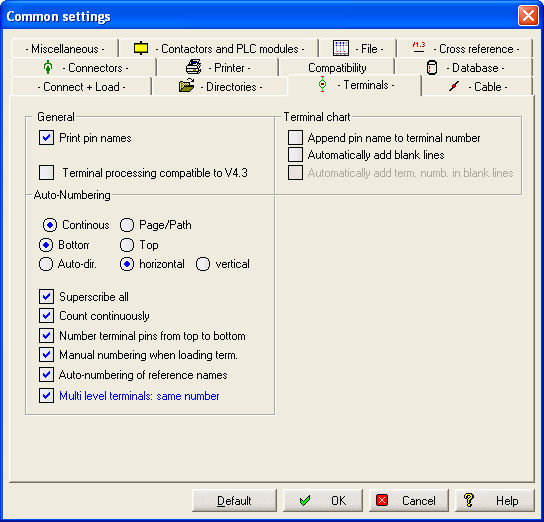
Terminal numbering comprises 2 levels:
the reference name of the whole terminal strip
the individual terminal connections.
Since reference names are usually entered manually, you must explicitly allow the numbering of reference names, by enabling it in the Configuration. You can also set the option of numbering the terminal connections manually as soon as a terminal contact is loaded. This is useful in the case of terminal contacts named with letters (e.g. PE) .
The numbering itself is carried out automatically. The type of numbering is set in the Configuration:
continuous or with page/path
position pin numbers on top or bottom. The unselected pin number (top or bottom) will be deleted!
orientation (vertical/horizontal, auto)
count to include previously created terminal connections
superscribe all previously created terminal connections
Hint
he setting ‘Auto’ for the orientation of the pin numbers means that the orientation given in the Symbol editor will be retained. Any other setting (vertical or horizontal) alters the pin orientation of the terminal contacts (and the text orientation as well) permanently!