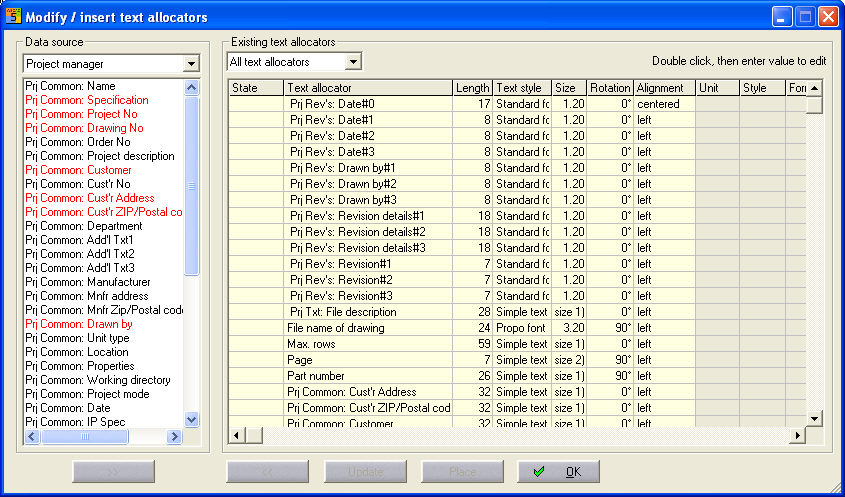
For all text allocators:
Every allocator can be formatted at the right side of the dialog in various ways.
Length
Maximum number of characters: Text = 100 Simple text = 49 characters
Text style
Standard font; Propo font; Special font; Text
Size
of the characters
Rotation of the allocator:
0°; 90°; 180°; 270°
Alignment of the text:
left; centered; right
Example
Snapshot from Cable list
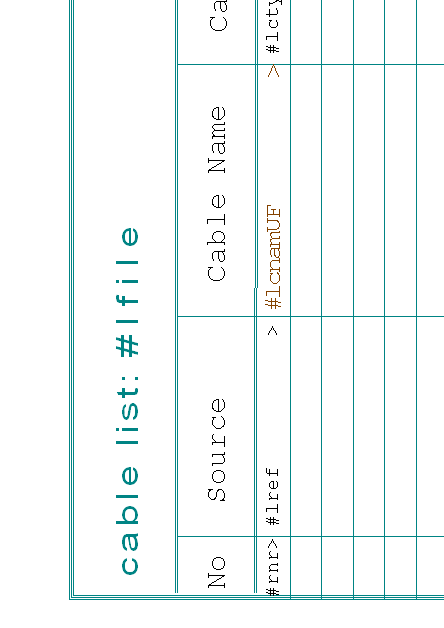
text allocators based on additional database fields:
This allocators are only in the form type 'material list' available
Formatting
In the Length column, the number of characters can be specified, i.e. how many characters of the value which is to be displayed are output on the form. The maximum number of characters is determined by the text type.
Simple Text = 49 and Text = 100 characters
Example ##...> Text allocators six characters long when the length = 6
Text type
With Text type, it is possible to adjust the font and the text type. It is advisable to use Simple Text for Text allocators if a maximum length of 49 characters is sufficient. Although there are more degrees of freedom with Text, this should not be used, particularly for number variables, since a proportional font (such as Arial) is often used for Text and series of numbers may not line up exactly. Selection is made by double clicking on the field.
Size
The Size column determines the font size of the Text allocator and the value shown. Select by double clicking on the field.
Rotation
In the column Rotation, you can enter the angle in degrees at which the Text allocator must be rotated when placed. Select by double clicking on the field.
Alignment
The alignment defines the position of the displayed value shown within the character length of the Text allocator. (left justified, right justified or centred). Select by double clicking on the field.
Other functions
The form dialog is closed by clicking on the Place button. The new Text allocators are laid at the cursor one after another and can be placed on the form. The Delete button deletes all of the Text allocators from the current form which are marked in the right hand window of the form dialog. The form dialog remains active even when you click on the form which is displayed in order, for example, to place the selected Text allocator.