 WSCAD
5 provides the ability to create labels for different sections:
WSCAD
5 provides the ability to create labels for different sections:
WSCAD
5 provides the ability to create labels for different sections:
Equipment
Cable
Terminals
PLCs
Some parts of the settings are identical for each section. The size and position of the labels can be in mm or inches depending upon the units selected:
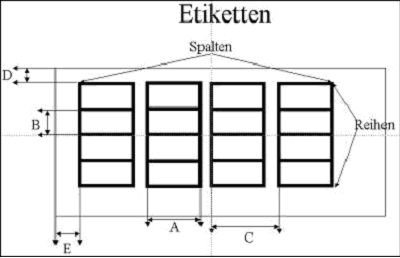
A Label width
B Vertical spacing (distance between rows)
C Horizontal spacing (distance between columns)
D Left margin
E Top margin
F Number of columns
G Number of rows
Please remember that the Windows printer drivers have margin settings. We recommend that you print a test page and then correct the values. Within the group 'Font' you can change character size, font type and thickness. Remember that most available fonts only include 2 or 3 thicknesses (THIN, NORMAL, BOLD).