 The
reference names
of all symbols can be printed on labels. For this purpose, you have to
provide certain data (e.g. width, height, distance, etc.) about the labels
you need.
The
reference names
of all symbols can be printed on labels. For this purpose, you have to
provide certain data (e.g. width, height, distance, etc.) about the labels
you need.
The
reference names
of all symbols can be printed on labels. For this purpose, you have to
provide certain data (e.g. width, height, distance, etc.) about the labels
you need.
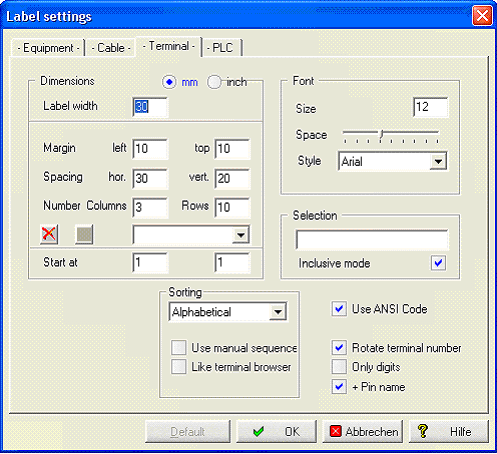
The text to be printed will be positioned on the sheet according to these guidelines. You can define for example Dimensions, Fonts Margins and make Selections.
You can save the composition with an appropriate name. In order to do this, you enter a name in the middle line and then click on the disk symbol. You can delete the file with the red X.
Start at means to begin printing at Column x and Row y .
Sorting
The sorting can be made Alphabetical, Mixed, By Level and by Coordinates.
Another options are Use manual sequence and Like Terminal browser.
Selection
The extensive selection capabilities have been extended further by the introduction of the wildcard #. This character stands for any number of numbers and makes it easier to select certain symbols which, for example, are designated with a prefixed page number.
Another selection criterion can be to restrict to certain reference names (setting inclusive is active) or to exclude certain reference names (setting inclusive is not active).
Example #K2? => 1K21, 10K21, 72K25 ........
Use ANSI-Code
With the option Output in ANSI code, you can determine if DOS or ANSI (=Windows) code sets shall be used for labelling systems in the output to a file. When the setting is wrong, special letters such as ä or Ü are displayed incorrectly.
Rotate terminal number
The terminal number is rotated by 90o anticlockwise when output.
Only digits
No terminal numbers with letters are printed out.
+Pinname
The pin name is output together with the terminal numbers.