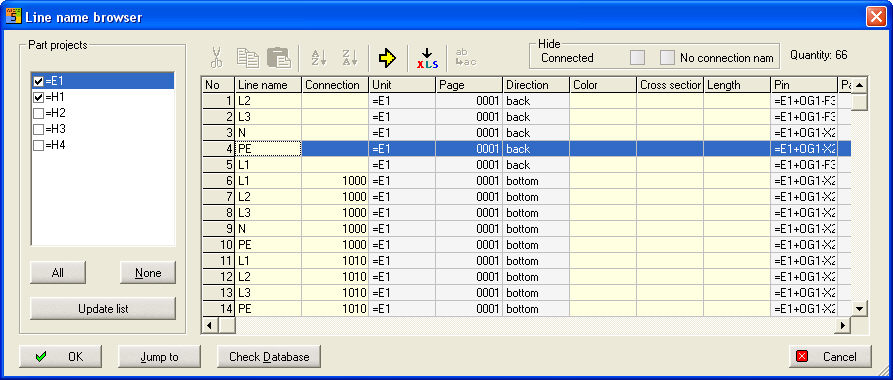
The Line name browser is called with menu Automatic/Wiring/Browser.... . It is offering a fast overview about the connections of the lines.
Advantage:
You have not to create an output e.g. in a file to control the connections. In the browser you can sort and select, that means you can see the connections which they are shown in a later output file.
The line name DB is in the project directory and the project is completed with the file WSCAD-LTG.MDB. If you call the browser command a data base is produced with Line name, Color, Cross section etc.
Yellow marked table fields can edited, all grey fields are blocked. You can sort and hide columns.
Rule
To use the browser reasonable you should attend the principle of connections. It means that identical line names can brought together with definition of a Connection identifier. For 2 identical line names there is only one identifier.
If this principle is used it is possible every time to modify the connection identifier regardless of which connection has been drawn.
View the connection
In CPP-Projects
you see on the left side all Part projects
which can be activated.
In Standard Projects this part
is inactive.
With button All or None
you can see all or none part projects.
Update makes a new list
On the right are the line names and the allocated parameters.
With the above menu bar you can cut, copy, insert and sort.
With the yellow arrow you can jump directly to the line name (mark the whole line).
With the XLS button a file in Excel-Format is created. Define your file name.
Columns can be hidden or not
Sorting
You can sort ascending and descending in every column. Multi selection is only possible with Line name and Connection.
Example
Must be done new.