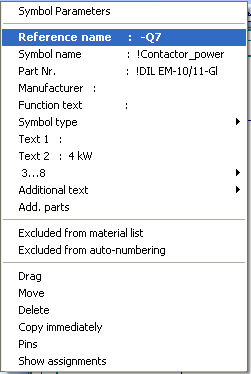
The reference name is normally pre-assigned (first the page number and followed by a sequentially number) so that it only occurs once throughout the entire set of drawings. This reference name is changed into the desired format later by using the autonumbering feature (see also “Automatic numbering”).
Alternatively, select the option Preset ref. name with page/path under the Settings tab Contactor and PLC modules.
The reference name can be changed directly by clicking on the menu Symbol Parameters – the contacts and the contactor database are corrected automatically (with Contactor Management switched on).